Is this billing email, shared-folder notice, quote request, or domain renewal real?
A failed-payment, file-share, quote or domain-renewal notice can be a scam. Here's how to spot each one and what to do if you already called, clicked or paid.
2026-11-11 · Chris Coulson
How owners, office managers and bookkeepers in York, Lancaster and Harrisburg can spot fake invoices, shared folders, quote requests and domain-renewal notices — and what to do if they already called, clicked, typed a password or paid.
By Chris Coulson, Coulson Technologies · York, PA
Chris Coulson has 40+ years of IT experience, 22 years in business, and runs Coulson Technologies in York, PA.
Treat an unexpected email about a failed payment, a shared "vendors and invoices" folder, a new buyer who wants a quote, or a domain renewal that looks like an invoice as suspicious until you check it yourself. Do not call a phone number printed in the email, do not type your password on a page that opened from that message, and do not pay a domain notice from the letter itself. Open QuickBooks or your files the way you normally do — from your own bookmark or the app — and confirm any request on a phone number you already have saved. Check a domain renewal inside the registrar account you already use.
These messages work because they look like ordinary office work. Someone in accounting, estimating or the front office is trying to keep payments moving or answer a new customer. A domain notice that looks like a bill can land in the same stack of invoices. That is exactly who the senders hope to reach.
I got a QuickBooks payment-failed email with a phone number. Is it real?
Not if the only next step is to call a support number printed in the email. Security researchers call this callback phishing — a fake email that skips the usual link and instead gets you on the phone.
On October 29, 2026, Infoblox Threat Intel published research on a campaign run by one actor who controls more than 350 website addresses that look like QuickBooks. Most of those addresses were registered in a single week, from June 29 to July 5, 2026. The emails borrow QuickBooks branding and read like a billing or renewal notice — for example, that a payment failed or a card did not go through. Instead of a link, they give a "toll-free" support number. The numbers Infoblox observed used the 805 area code. On the call, the scammers try to steal QuickBooks logins.
A small-business summary of that research, published by Rhinotech on November 9, 2026, notes an important detail about the scale: the 350-plus figure counts lookalike website addresses, not victims. Infoblox did not publish how many people called or what was lost.
The emails can also include a tiny hidden image that tells the sender which address opened the message. That does not infect your computer. It does tell the scammers that the address is real and someone is reading.
Infoblox reported the sender to one bulk-email provider on August 25, 2026. That provider suspended the account, and the observed emails stopped. On September 8, the same actor came back using a different service. Infoblox says the campaign continues.
How to spot this one:
- The message is about a failed payment, a renewal or a billing problem, and the main instruction is to call a number in the email.
- The number is labeled toll-free but uses an ordinary area code.
- The person who answers wants your QuickBooks password, a one-time login code or remote access to your computer.
- You feel rushed to "save" the account before you can look inside QuickBooks yourself.
If a payment really failed, you will see it when you open QuickBooks the way you always do — from your own bookmark or the app, not from that email.
Is this shared-folder email from accounting real?
Not if it arrived out of the blue and the only way to see the folder is a button in the message. On November 11, 2026, PCrisk published an analysis of a "Shared Folder Request" email that pretended to be a folder-sharing notice. It claimed a colleague's accounting team had shared a folder labeled "vendors and invoices" and told the reader to click "Go to folder."
That button did not open a real shared folder. It led to a fake company sign-in page that asked for a work email address. After the email was entered, a second page appeared that copied a familiar sign-in screen — in the case PCrisk examined, a copy of Zoho's sign-in page. Anything typed there went to the scammers.
With that login, they can read private messages, open business files, pretend to be you and send the same kind of email to people who trust you. PCrisk states that Zoho Corporation has no connection to this scam. The senders were copying its look without permission.
How to spot this one:
- You were not expecting a share, or the "vendors and invoices" folder is not something your office actually uses that way.
- The message wants you to click a button instead of the files showing up in the file app or website you already use.
- After you click, you are asked to sign in — especially if a second sign-in page follows the first.
- The address in your browser does not match the service your office actually uses.
- The note says the message came from an unmonitored address and asks you not to reply.
Open shared files from your own bookmark or the app. If you are unsure, call the person who supposedly shared the folder on a number you already have — not a number or button in the email.
A new buyer wants a quote and sent a project portal link. Is it real?
It might be a real inquiry, and it might not. The safe move is to check the buyer before you open a portal or type your work password.
On October 15, 2026, Fortra's research team reported a 12-fold rise in malicious emails that use a request for quote — a normal ask for pricing on a job — along with project invitations and procurement inquiries, from October 2025 to September 2026. Help Net Security covered that research the next day. Nearly 73% of those lures led to a page built to steal logins. The messages Fortra reviewed came from 664 different sender domains.
The first email is often short on purpose. It may name a purchasing manager or company representative and ask whether you can quote on an upcoming project, while giving almost no detail about the work itself. If you reply, the follow-up typically includes a link described as drawings, an RFQ package, a secure file transfer or a procurement portal. That page often copies a Microsoft 365 sign-in screen, or a similar work login, before it shows anything. Fortra and Help Net Security note that some of these pages also try to collect extra login codes or sign-in details. A smaller share delivered harmful software.
How to spot this one:
- There is no project scope and no RFQ or job number you can check.
- The sender's email domain does not match the company they claim to represent.
- A portal or document link wants your work password before you can see the files.
- The buyer is new, and you have not confirmed them on a number you found yourself.
A real new customer can wait while you look up the company and call a number from its own website or your own records.
I got a domain renewal letter or email that looks like an invoice. Is it real?
Not if it came from a company you do not already use as your registrar — the company that actually holds your domain. These notices arrive by mail and by email. They often look like a bill, with your domain name, a price, a payment stub and a deadline. The fine print is easy to miss. It usually says this is not a bill, or that it is a solicitation, and that you are under no obligation to pay unless you accept the offer.
Some of these notices are meant to move your domain to another registrar, often at a higher price than you already pay. That trick is sometimes called domain slamming. Sangfroid Web Design describes how an official-looking "urgent" renewal can transfer the registration if you pay and complete the form. Other notices look just as much like a renewal invoice but are selling something else, such as a website directory listing. The DomainNetworks letter below even says the company is not a domain registrar and does not register or renew domain names. Paying it does not renew your domain.
I have one of these DomainNetworks letters at my office. It was sent to me about my own domain renewal. It is a total scam. Watch for these.
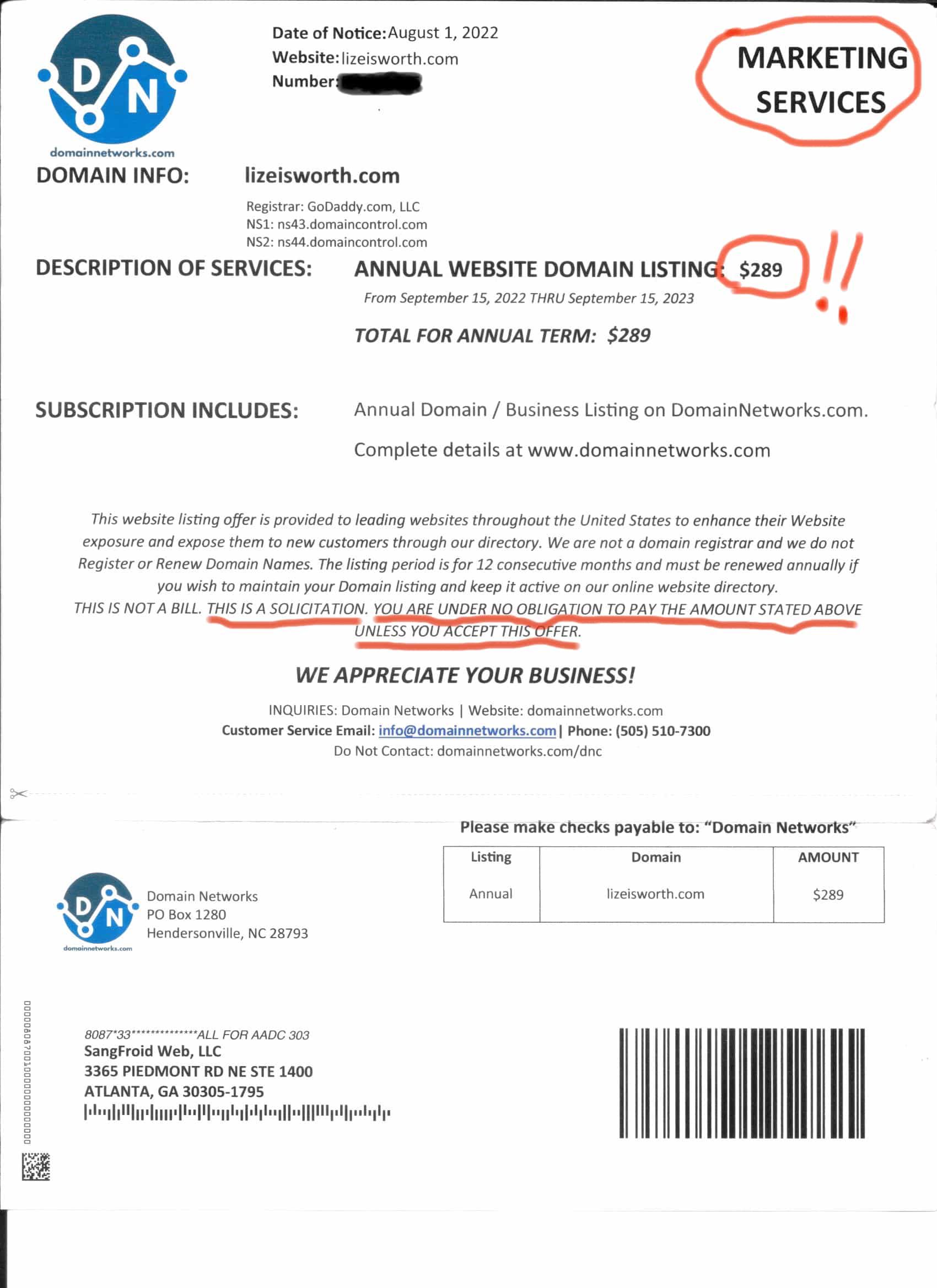
Example via Sangfroid Web Design.
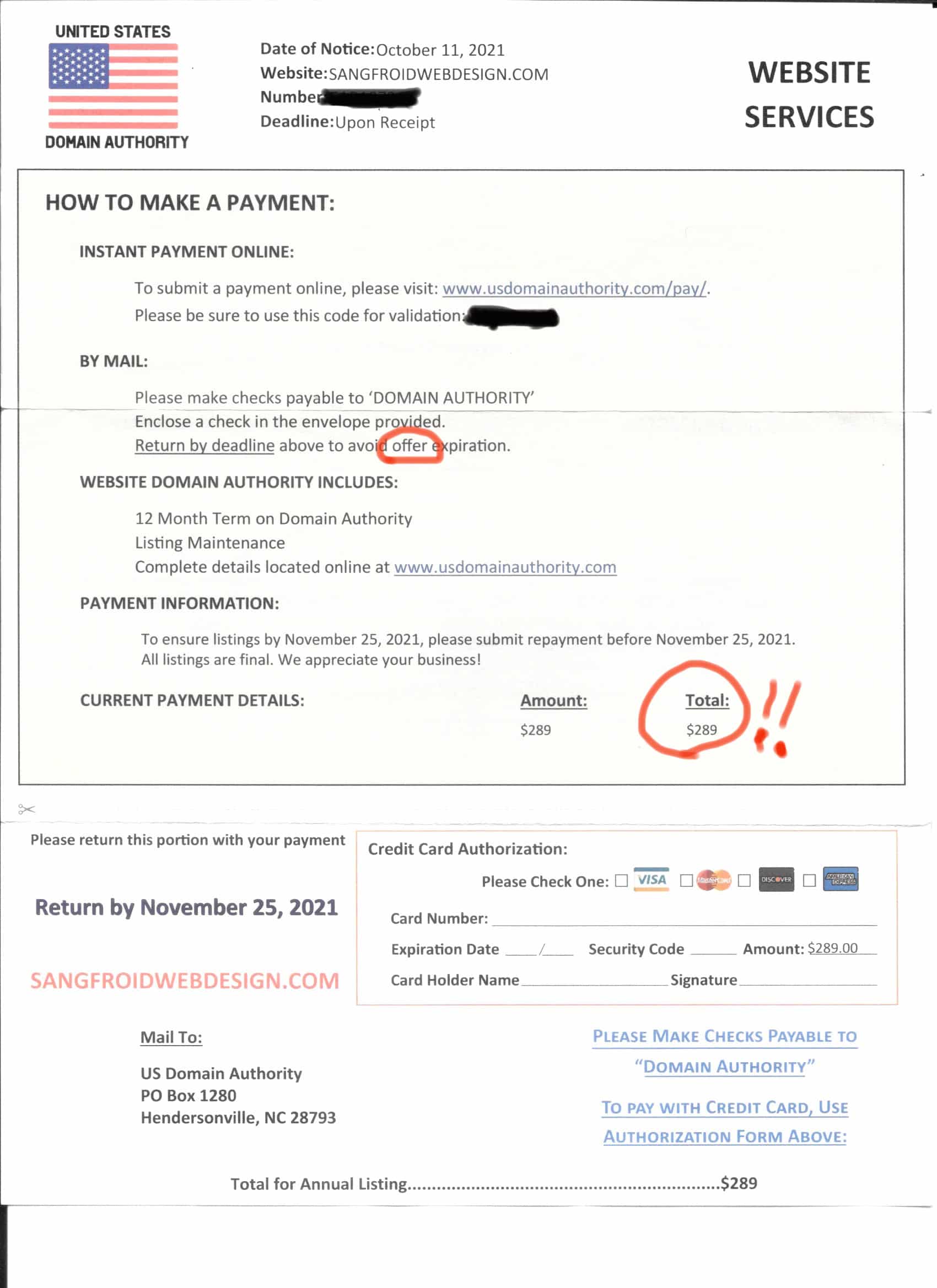
Example via Sangfroid Web Design.
How to spot this one:
- The company name on the letter is not the registrar you already use.
- The fine print says this is not a bill, not an invoice, or that it is a solicitation or an offer.
- The price is higher than you normally pay to renew the domain.
- The notice uses urgency — a deadline, "upon receipt," or a warning that you could lose the domain.
- You have not checked the real renewal date in the registrar account you already use.
Do not pay from the letter or email. Do not call a number printed on it. Open your registrar the way you always do, and look at the renewal date there. If you are not sure who holds the domain, look it up with ICANN's Lookup tool. If the date in your account is still in the future, you can ignore the notice. In a September 2020 guide, ICANN advises domain holders to be cautious of offers or warnings about renewing a domain, to know the real expiration date, and to be suspicious of messages that ask for immediate payment.
If you already paid, contact the registrar you already use, ask them to lock the domain and check for a transfer, and call your bank or card issuer using the number on the back of the card or your statement.
What should I do if I already called, clicked, typed my password or paid?
Do not panic, and do not try to fix it by calling the same number back. Acting quickly matters more than assigning blame.
- Hang up and close the page. Do not call back a number from the email, and do not type anything else on that page. If you paid a domain notice, stop any further payment.
- If the caller had you install software or take over your screen, disconnect that computer from the internet and have your IT person or a trusted professional check it before you use it again.
- Change the password from a device you already trust — not from a page that opened out of the email. If you reuse that password anywhere else, change it there too.
- Sign out of other sessions, so anyone who got in is pushed out. Most work accounts have a "sign out everywhere" or "sign out of other sessions" option in the security settings.
- Turn on multi-factor authentication if it is not already on. That is an extra login step, such as a code on your phone, on top of your password.
- If money moved, or you shared card or bank details, call your bank or card issuer using the number on the back of the card or your statement — not a number from the email or letter. If you paid a domain notice, also tell the registrar you already use and ask them to lock the domain and check for a transfer.
- Tell your IT person or provider what happened, including whether you called, clicked, typed a password, installed anything or paid a notice. Keep the original email or letter rather than deleting it.
Rhinotech's summary of the QuickBooks campaign and PCrisk's shared-folder analysis both stress the same order: stop, change the password from a trusted device, lock down the account and get help if money or remote access was involved.
What office habits stop these scams?
Write the rules down and tell everyone who handles billing, bookkeeping, estimating or new-customer email. Busy people fall for these messages, not careless ones.
- We never call a phone number that arrived in an email or text. We look the number up ourselves or use a number we already have saved.
- We never buy, pay or change bank details because of a message alone. Payments need two-person approval.
- We open QuickBooks, Microsoft 365 and shared files from our own bookmark or the app — not through a button or link in an unexpected email.
- We never pay a domain renewal from a letter or email that arrived out of the blue. We log into the registrar account we already use and check the date there.
- We never give a password or a one-time login code to someone who contacted us first.
- We never install software or allow remote access because a caller asked.
- If a new buyer sends a portal link, we find the company's number ourselves and call before we sign in.
Owners, say this out loud to your team: you will not get in trouble for pausing to check. A real vendor, a real QuickBooks notice, a real customer and a real domain renewal can wait for that check. A scammer cannot.
Coulson Technologies helps businesses in York, Lancaster, Harrisburg and South Central Pennsylvania with cybersecurity. If someone already called a number, typed a password, paid a notice, or you want help putting a simple check-first rule in writing for your team, get in touch. It is a conversation about what happened, not a lecture.
If you don't know, don't click.
What else do owners ask about invoice, file-share and domain-renewal notices?
I got a QuickBooks payment-failed email with a phone number. Is it real?
Treat it as suspicious if the email tells you to call a number instead of checking inside your own QuickBooks account. Infoblox documented a campaign that uses this exact pattern. Open QuickBooks yourself and look. If nothing is wrong there, do not call the number in the email.
Is this shared-folder email from accounting real, and what if I typed my password?
An unexpected "vendors and invoices" share that only opens through a button in the email is a common trick. PCrisk described one that led through two fake sign-in pages. If you typed your password, change it from a trusted device, sign out of other sessions, turn on the extra login step and tell IT.
A new buyer wants a quote and sent a project portal link. Is it real?
It may be, but you cannot tell from the email alone. Fortra found that most of the fake quote-request emails it classified led to a page built to steal logins. Look up the company yourself and call a number you found independently before you open the portal or type a password.
I got a domain renewal letter that looks like an invoice. Is it real?
Treat it as suspicious if it came from a company you do not already use as your registrar. These notices often look like a bill, but the fine print may say this is not a bill, or that it is a solicitation. Paying will not renew the domain with the company you already use, and in some cases it can transfer the domain or buy a listing you did not ask for. Open your registrar account and check the real renewal date. Do not pay from the letter.
I only opened the email. Is my computer in trouble?
Reading the message, by itself, is not the same as calling, clicking or typing a password. A hidden image in some of these emails can tell the sender that the address is live, but Infoblox and Rhinotech describe that as tracking, not an infection. If you did not click, call or enter anything, you do not need to change passwords. You should still delete or report the email and avoid calling any number inside it.
What if the email looks like it came from someone at our company?
A familiar name is not proof. The shared-folder scam PCrisk examined used a colleague's name and an accounting team. A stolen mailbox can also send real-looking mail from a genuine address. Call the person on a number you already have, and ask IT to review the account if the message came from a real company address.
Which sources support this guide?
Outside facts in this guide come from these pages, checked November 11, 2026.
- Infoblox Threat Intel: The Ultra Trail: From Viewer to Mailer (published October 29, 2026).
- Rhinotech: Fake QuickBooks Billing Emails Push a Phone Call (November 9, 2026).
- PCrisk: Shared Folder Request Email Scam (Tomas Meskauskas, November 11, 2026).
- Fortra: The Rise in RFQ and Project Invitation Scams (posted October 15, 2026).
- Help Net Security: Hackers disguise phishing as promising business opportunities (October 16, 2026).
- Sangfroid Web Design: What Is Domain Slamming?…Don't Fall Victim (last updated January 15, 2026). Hosts the DomainNetworks and United States Domain Authority example images.
- ICANN: Important Tips to Help Keep Your Domain Name Secure (September 2020). ICANN's Lookup tool is at lookup.icann.org.